Coping with AI-driven development
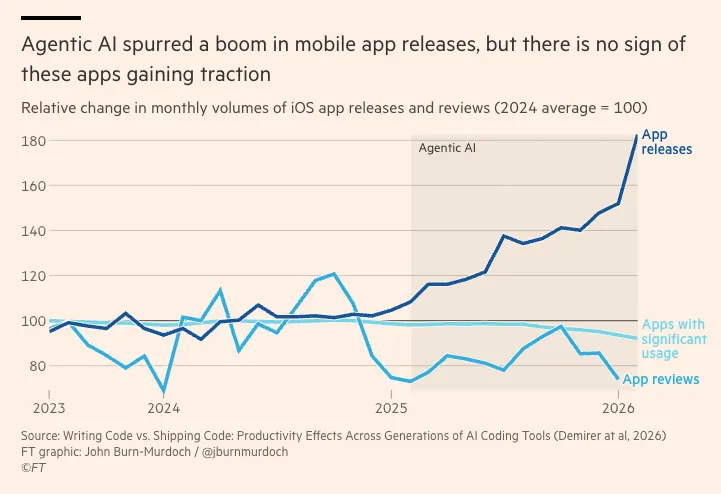
For the past couple of years we’ve seen the rise of AI, and while it’s not as integrated in every industry as our social media bubble wants us to believe, it sure as hell took the coding/software world by storm.
I don’t know what the future holds, at least for me, the technology and the numbers don’t add up.
On the one hand you have a technology that is promising increased productivity and efficiency (and delivering on it for a lot of people), and on the other you have all of the AI companies burning money like there’s no tomorrow, with no real plan to profitability, so all my brain can do is ask, “when is the money running out, and what happens then?”
Today I wanted to share a bit about how I’m coping with the rise of AI in software development, what (I hope) works, what doesn’t, dealing with increased expectations, verifying its output, and exercising your brain.
But first, I want to get this question off my chest
Where is the increased productivity going?
Everywhere I look, I see that the people writing software with AI are working more, not less, either for their side projects, or for work.
If you’re truly able to move 10X faster, why are you putting in more hours? And is what you’re doing during those hours actually making an impact?
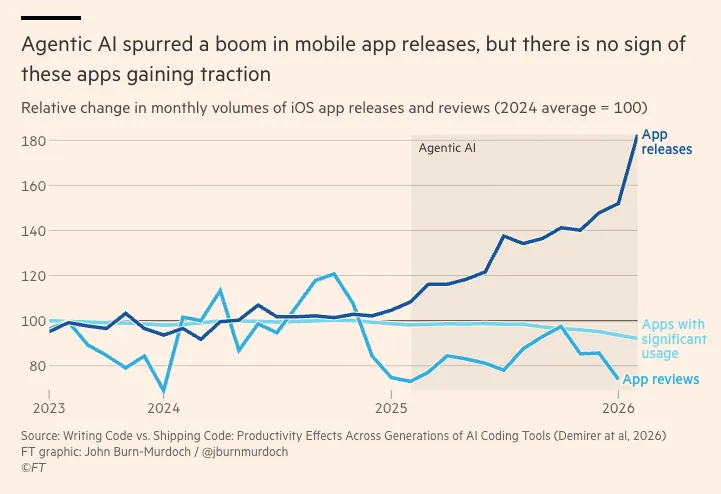
For the past 2 years the heavy marketing has been about how we’ll be able to build better software faster, and the only thing I see is more software, not better software.
A lot of the services that I’ve used for years are now dropping the ball, while the others are adding AI features that make the things I need to do on them slower and more cumbersome.
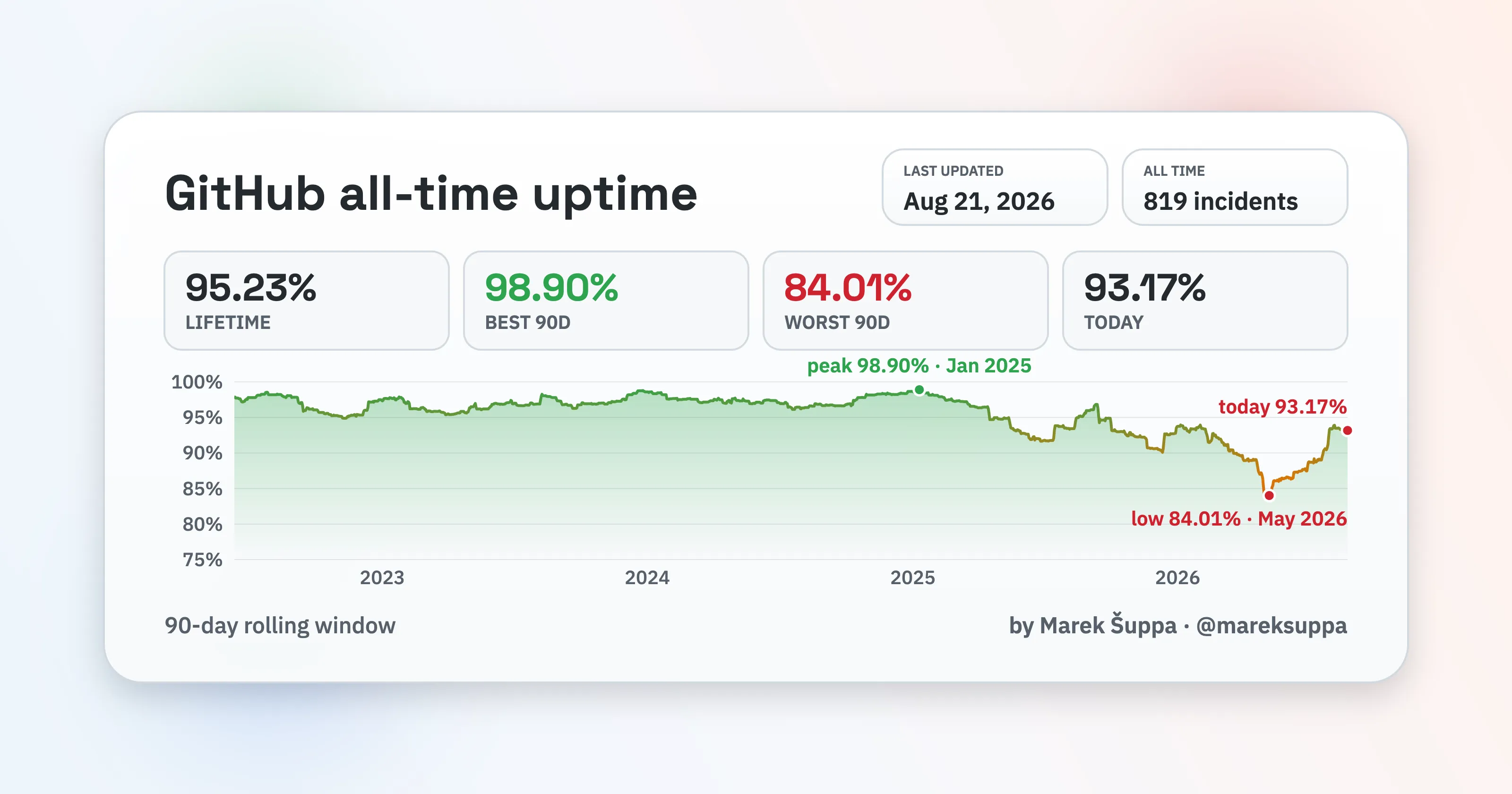
And on the new apps front, we’re building and shipping TONS of new apps, myself included, but are they really being used? I’ve built 5 apps for my personal use, out of those 3 have made it to the app store, the one with the most users has 25, out of those, 8 never completed the onboarding, and only 6 (including me) are actually using it.
Alright, having said that, here are a few things I keep in mind when dealing and coping with AI development
The impossible mandate everywhere
Most workplaces are using a form of X% of the code should be written by AI now, and in a lot of them, X = 100.
This is fine, businesses are businesses, and if money-wise it makes sense to them, they’ll go for the 100% AI building. The problem starts when expectations don’t align.
Suddenly, 100% of the code needs to be written by AI, + you need to review and own the code + you can’t spend the time reviewing the code because that would eat all the time you saved by having the AI build it.
You have to speak up, if you don’t that’s how you end up building 100% with AI during work hours, and then spend your free time reviewing and gaining understanding about the code which will lead to burnout every single time.
This will look different everywhere, because of how different company cultures are, whether you’ll be punished for speaking up, and how much you actually can afford that punishment.
Giving up reading every line
When you get to that point where AI is writing 100% of the code, there is no way you realistically can read the code it produces, but that doesn’t mean you should stop reading entirely, here are a few things that will help you keep an eye out.
Smaller chunks, easier to test
I break down my tickets as small tasks, and work one task at a time, that way, at the end of each task, I can run the app and verify it did what it says it did (which a bunch of times, it doesn’t)
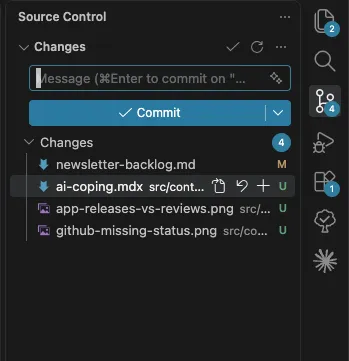
Git commits after each task
This one sounds obvious, right? But not for the reason you think, keeping my tree clean, helps me keep an eye out on the files being updated, a quick glance there tells me if the changes are being done in the files I THINK should be done, if I notice something off, I can dig deeper and see if the other file needed changes, if the new file created was actually needed, etc.
Keep an eye out on the prose outcome
Independently of where you’re using it, the CLI or the desktop app, once you give it a prompt, it starts narrating what it’s doing, which a lot of times gives you insight into things it is going to do that you might do differently.
For example, you’re building the profile page, the agent responds with “mobile UI done, now I need
to build an endpoint that fetches preferences” and you suddenly hit the ESC key, why? Because you
know that when you call users/me the user preferences are already there, so you can tell it, no,
it already exists, use users/me instead of creating a new endpoint.
Keep tags, but verify
I work on my side projects around my full-time job, family time, and taekwondo, so that means, I usually touch my personal computer on the weekends.
Because of that, I manage a task list in each project, and I add tags when something is done, so that I can come back to it and ask “where are we on the project, what’s next”
I will see things like “x, y, z are shipped, current in progress task is…”, which should be great right? In reality, it’s only as great as those tags are real.
I have a tax preparer kind of app based entirely on the CRA (Canada Revenue Agency) T2125 form, which is the category breakdown for my expenses as self-employed.
In the beginning of the app I was marking my medical bills as expenses, you know, prescriptions, physio, dental, stuff that’s not covered by OHIP (Ontario’s Healthcare System) so that I could tell my friend who does my taxes and she knew where to put them.
She told me that they were not something I could put on my T2125 form, and they should be part of my
deductions/credits instead of expenses, so I had Claude build a reclassification feature, where I
could click on my medical expense, click swap classification, and it would change it to a
deduction/credit type, mapping the fields correctly.
Once done it marked it as shipped, I went out for lunch, and forgot about it, when I came back I asked where we were with the project, it said reclassification feature had been shipped, and that it was ready for the next task.
I was happy because I had a bunch of physio bills, braces, and my bp pills listed as expenses, so I ran the app, tried to change it, and couldn’t find where.
It turns out it built the reclassification service, not the entire feature, meaning, the backend had the endpoint ready, but there was nothing calling it, no mobile functionality had been built, and yet, it was marked as shipped.
Which, to be honest, wouldn’t have happened if I were more strict with the advice I gave you above 🤷🏻♂️
It doesn’t really learn from the mistakes or instructions
Going back to Loonie Logs the app I use to track stuff for my taxes, I noticed something and it’s that it will make the same mistakes, ignore the same instructions, and add back what you’ve removed multiple times.
You might think your AGENTS.md or CLAUDE.md files are shielding you from it, but no, one big thing to learn is that
LLMs are probabilistic, not deterministic
Which means that they will always give you the most probable reply to a prompt you write, whether that reply is true, solid, valid, or whatever adjective you want to use is another story. So everything in your agent/claude files becomes instructions, not rules.
Every time I came back to do something on the mobile dashboard view, Claude kept trying to add a “Net Income” (income - expenses) card. Makes sense, right? You take the income, you take out the expenses and you’re left with the net income or profit.
Nope, not by a long shot, tax credits, deductions, business use of home, capital cost allowance, they are all different. I donated $200 to the NDP before the latest leadership race, I can claim 75% of that as tax credits. So in this case, income - expenses is NOT profit, taxable income, or anything defensible.
Loonie Logs is a tracking and organizing tool, not an accounting tool, showing a profit-looking number invites users to rely on it when it can be dangerously wrong.
It’s worth mentioning that every time I saw it added it, I pushed back, and was specific, added it to the CLAUDE.md, then it wrote it again, I prompted “write it wherever you need to write it so that this doesn’t happen again” and it replied that it had committed it to memory.
Then it happened again, when I asked it to remove it, it left it there but changed the wording, like “Net business income before adjustments” and I was like nope, delete all of that. In the end, I added unit tests in the dashboard view that fail if there are words like profit, net, or properties like netBusinessIncome, netIncome, etc.
It hasn’t happened since, but it’s hard to tell if it’s because of that or simply because I’ve been working on other features and not touched the dashboard since :D
It’s your brain, use it or lose it
Lastly I want to say this before leaving, my biggest worry is not the codebase, it’s that my brain gets slower and it becomes harder to think and process information the more I rely on tools like these.
So for me AI stays in the coding lane, and I don’t use it outside of it. It’s easy to say “create a message to my landlord about the smell in the basement we already discussed, they haven’t come to check it out, it should be direct but not confrontational.” (And yes, I’m guilty of sending that message)
It removes work from you, but it’s work that’s actually worth doing, your brain might not be a muscle, but if you don’t exercise it, you’re putting it at risk.
So far there have been studies linking excessive reliance on AI and reduced brain activity, weakened neural connectivity, and impaired memory and critical thinking. It’s still early and samples are small, but that’s where we’re going.
So, do yourself a favor, read. Anything and everything, manga, comics, novels, sci-fi books, fantasy books, business books, whatever you want to read, but read. And also, give writing a try, write that email yourself, explain the changelog, write the JIRA ticket.
Whenever I think about AI in learning, writing, and education I come back to a post I saw on Bsky
You can take a forklift to the gym and use it to move all the weight around, it’s easier, but the job was never moving the weight around.
